Enter the email you used when applying for an ESBN to see the status of your submission.
Generate Barcode
If your ESBN was approved, copy the code shown above and paste it below. Pick a frame color first, then generate — your barcode will be pasted directly into the ESBN frame.
build: 2026-08-20-crisp
1. Pilih Warna Bingkai / Choose Frame Color
2. Masukkan Kode & Generate / Enter Code & Generate
Specimen · Educational Serial Book Number
Gagal mengunduh otomatis karena pembatasan CORS pada gambar bingkai. Silakan klik kanan pada gambar di atas → "Save Image As" untuk menyimpannya secara manual.
⚠ Required for international sale:
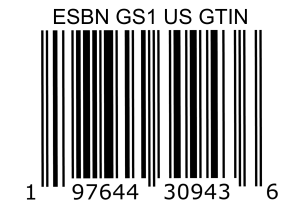
every ESBN-registered book must also carry the ESBN GTIN barcode (GS1 US) shown below.
This is the internationally recognised retail barcode registered under GS1 US
(GTIN 197644309436) that makes your ESBN legally sellable in bookstores and marketplaces worldwide.
When printing your book cover: place the ESBN GTIN barcode above, and the
ESBN frame barcode you generated above right below it. Together, these two barcodes are what
give your book full ESBN legality for international trade — the ESBN frame alone is not sufficient on its own.